Barracuda NGFW: Reset Root Password
This article is from a fellow tech enthusiast. #Brambo
1) Firewall connected to Control-Center
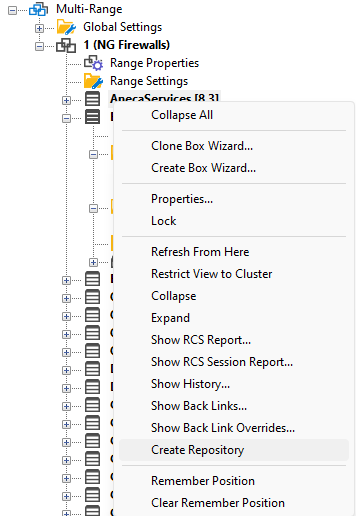
We will overwrite the current unknown root password with a known password, by using a cluster repository. If no cluster repository exists, then you need to create a cluster. Right click on the cluster name and select Create Repository:
-
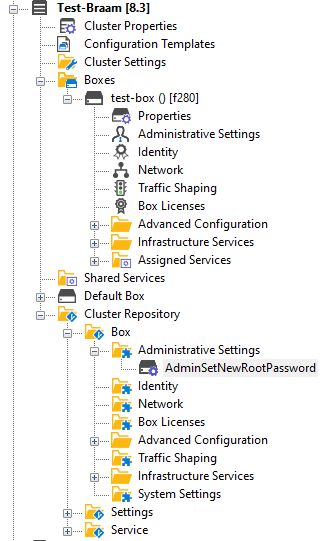
Copy Administrative Settings The next step would be to copy the existing Administrative Settings to the Cluster Repository. Go to the box and right click on Administrative Settings and choose Copy To Cluster Repository…. Give it a name like AdminSetNewRootPassword.
-
Edit AdminSetNewRootPassword Repository Now you can edit the newly created AdminSetNewRootPassword Cluster Repository and fill in a new root password. By copying the settings from the box first, all other settings remain intact.
-
Copy Administrative Settings from Cluster AdminSetNewRootPassword Repository Finally, copy back the settings from the cluster repository to the box. Right click Administrative Settings and choose Lock, then right click again on Administrative Settings and choose Copy From Cluster Repository…. The Control Center will now apply the new root password by clicking Activate.
2) Low-privilege user access
If we only have low-privilege user access (no root password), we can use a trick to reset the root password via a cronjob created with the Firewall Admin tool.
Tasks added with the System Scheduler run as root. Use the following command to change the root user’s password:
```bash echo ‘root:ngf1r3wall’ | sudo chpasswd ```
Navigate to:
``` CONFIGURATION > Configuration Tree > Box > Advanced Configuration > System Scheduler ```
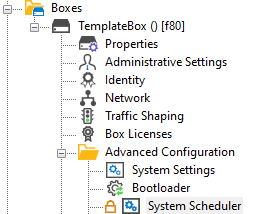
Under Generic Schedule, paste the snippet below:
```bash CONFDEF box/boxother/boxcron partial 8.3
[job_reset-root-passw] GDESC = DESCRIPTION = Resets the root password to the factory default password. COMMANDS[0] = echo ‘root:ngf1r3wall’ | sudo chpasswd COMMANDS[1] = /opt/phion/bin/hwtool -a 1 MINUTES = every MINLIST = 0 MPERIOD = 5 HOURS = list HOURLIST = 0 HPERIOD = 12 MONTHDAY = list MDLIST = 14 MDPERIOD = 14 WEEKDAY = list WDLIST = 6 WDPERIOD = 2 MONTH = list MONTHLIST = 6 MONTHPERIOD = 6 ```
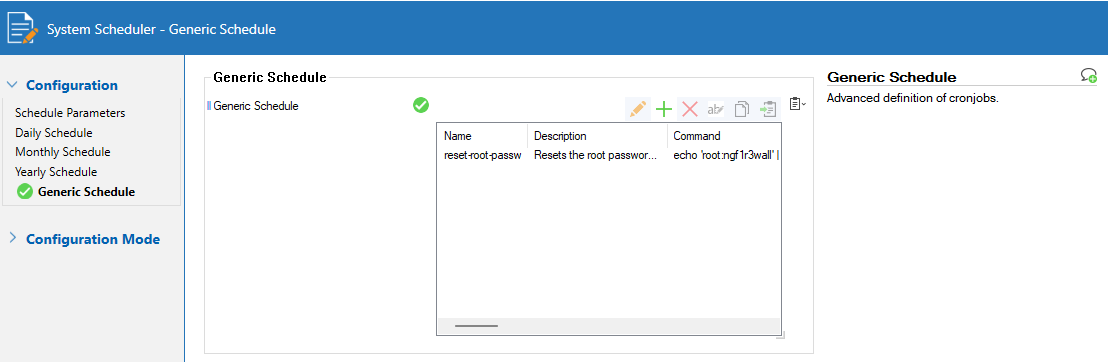
If you have physical access to the box, you’ll hear a bell ring when the second command runs. After that, remove the scheduled job. Otherwise, wait 5 minutes remotely before removing it.
3) Standalone firewall physical access
With console access (console cable or monitor+keyboard), you can reset the root password:
- Connect via console at baud rate 19200 and reboot the firewall.
- When the GRUB menu appears, press `e`. The GRUB password is ph10n (found in `/opt/phion/config/active/bootloader.conf`).
- In the GRUB config, find the Linux line and append `rd.break` at the end (press `Ctrl+e`).
- Press `Ctrl+X` to boot. You’ll drop to a root shell.
- Execute:
mount -o remount,rw /sysroot
chroot /sysroot
echo ‘root:ngf1r3wall’ | sudo chpasswd
exit
exit
- Reboot: the new root password is now set.
Source:
https://blog.bankveld.be/posts/barracuda-ngfw-reset-root-password/